
The Best Kid-Proof Tablets for Learning and Play
A good kid's tablet can survive drops, spills, and tantrums while providing a safe, curated digital playground.
The best models pair rugged hardware with robust, easy-to-use parental controls and age-appropriate content. Cheaper, less durable tablets often lack the 2-year ‘no questions asked’ warranties, comprehensive content libraries, and granular controls that define the top-tier options.
- Warranty is Everything The 2-year worry-free guarantee offered by Amazon is a game-changer, covering accidental drops and spills. It’s the most important feature for a device handled by a child.
- Content is King Amazon Kids+ provides a vast, curated library of apps, games, books, and videos, removing the guesswork and extra cost of finding safe, ad-free content.
- Case Isn't Enough While a puffy case is essential, true durability comes from internally strengthened glass and design. Don’t mistake a bulky case for a truly rugged device.
- Look Beyond Amazon Options from Samsung and Lenovo offer access to the full Google Play Store, providing more long-term flexibility and turning a kid’s device into a tablet for the whole family.



Best Overall: Amazon Fire HD 10 Kids Pro tablet
The ultimate kid-proof tablet with robust parental controls and a 2-year guarantee.
This powerful tablet combines a large 10.1″ HD screen with a 2-year worry-free guarantee. Robust parental controls and a year of ad-free content make
- Large, vibrant 1080p screen is great for videos
- Fast octa-core processor for smooth performance
- Slim but protective case feels less ‘babyish’ for older kids
- Comprehensive and easy-to-use parental controls
- Higher price point than other Fire Kids models
- Amazon Appstore is more limited than Google Play
- May be too large and heavy for very young children
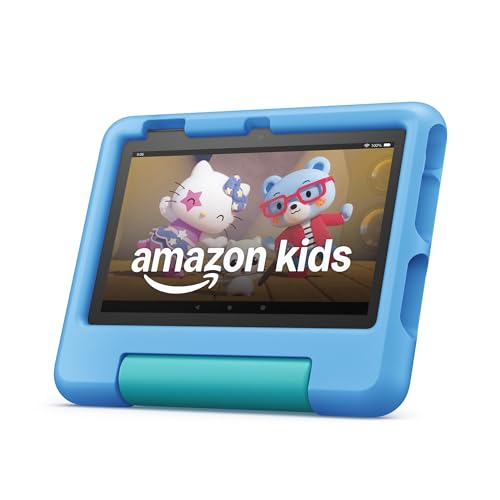
Best Budget: Amazon Fire 7 Kids tablet
The most affordable kid-proof tablet with a 2-year guarantee.
An unbeatable value, this tablet comes with a durable kid-proof case and a 2-year worry-free guarantee. It’s the perfect affordable, full-featured fir
- Extremely affordable price point
- Includes the essential kid-proof case and 2-year guarantee
- Compact and lightweight for small hands to hold
- Simple interface is perfect for a first-time user
- Noticeably slower performance than other models
- Lower resolution screen is less sharp
- Only 16GB of base storage feels cramped quickly
Runner Up: Amazon Fire HD 8 Kids tablet
A durable mid-size tablet with a great screen and 2-year guarantee.
A perfect middle ground, this tablet offers a bright 8″ HD screen and a full year of Amazon Kids+. Its strengthened glass and 2-year guarantee provide
- Great value for a clear, bright HD screen
- 30% faster processor than previous generation
- Strengthened aluminosilicate glass for better durability
- Excellent 13-hour battery life
- Still limited by the Amazon Appstore
- Not as powerful as the Fire 10 for demanding games
- Slower USB-C charging than premium tablets
Best Premium: Samsung Galaxy Tab A11+
A high-performance tablet for the whole family to share.
For families wanting a high-performance tablet, this Samsung offers a large 11″ screen and powerful processor. It’s a premium device that grows with y
- Large, high-quality display with smooth 90Hz refresh rate
- Full access to Google Play Store apps and services
- Powerful enough for the whole family’s use
- Generous 128GB of expandable storage
- Much higher initial cost
- Parental controls via Samsung Kids require more setup
- Warranty is for defects, not accidental damage like Amazon’s
Best for Longevity: Apple iPad mini (6th Generation)
A powerful, premium tablet that will last for years.
The powerful A15 Bionic chip and versatile iPadOS ensure this tablet will last for years. It’s an investment that grows with your child from simple ga
- Extremely powerful and fast for years of use
- Unmatched ecosystem of high-quality educational and creative apps
- Superior build quality and responsive user experience
- High resale value
- Very high price, especially for a child’s device
- Requires purchasing a separate, third-party rugged case
- No ‘worry-free’ guarantee for accidental damage
Family Sharing Pick: Lenovo Tab M10
A budget-friendly tablet with a large screen for family use.
With its large 10.1″ FHD+ display and included folio case, this is a great budget-friendly option for the whole family. IP52 water resistance adds a l
- Large, full HD screen is great for movies
- Google Kids Space offers a curated, safe environment
- Easy to set up separate profiles for parents and kids
- IP52 rating adds a layer of splash protection
- Performance can lag under heavy use
- Included case is a folio stand, not a rugged bumper
- Warranty does not cover drops or spills
Side-by-side comparison
|
Best Overall
Amazon Fire HD 10 Kids Pro tablet, ages 6-12. Brig
|
Best Budget
Amazon Fire 7 Kids tablet (newest model) ages 3-7.
|
Runner Up
Amazon Fire HD 8 Kids tablet (newest model), ages
|
Best Premium
Samsung Galaxy Tab A11+ 6GB RAM, 128GB Storage, Op
|
Best for Longevity
Apple iPad mini (6th Generation): A15 Bionic, 8.3-
|
Best for Family Sharing
Lenovo Tab M10 10.1" Idea Android Tablet, 256GB St
|
|
|---|---|---|---|---|---|---|
|
|
|
|
|
|
|
|
| Display Size | 10.1" | 7" | 8" | 11" | 8.3" | 10.1" |
| Base Storage | 32 GB | 16 GB | 32 GB | 128 GB | 64 GB | 256 GB |
| 2-Yr Accident Guarantee | Yes | Yes | Yes | No | No | No |
| Content Ecosystem | Amazon Kids+ | Amazon Kids+ | Amazon Kids+ | Google Play | Apple App Store | Google Play |
| Price | – | – | – | $299.99 | $507.13 | $229.98 |
| BUY NOW | BUY NOW | BUY NOW | BUY NOW | BUY NOW | BUY NOW |
What to look for in Kid-Proof Tablets
Kids will drop and spill on their tablets. A device’s ability to withstand abuse, and the company’s willingness to replace it when it inevitably breaks, is paramount.
Effective parental controls are non-negotiable. You need the ability to easily manage what your child sees, how long they can use the device, and what they can purchase.
A tablet is only as good as the content on it. A quality ecosystem provides a wide range of age-appropriate, ad-free, and educational content without constant oversight.
The right tablet for a 3-year-old is different from the right one for a 9-year-old. Consider the device’s size, weight, and the target age range of its default interface and content.
Are kid's tablets actually educational?
Yes, they can be powerful educational tools. Services like Amazon Kids+ and the Apple App Store are filled with high-quality apps for reading, math, coding, and problem-solving. The key is using the built-in parental controls to guide children toward this content over pure entertainment.
What's the difference between a Fire Kids tablet and a regular Fire tablet in a case?
The two key differences are the warranty and the included content subscription. The Fire Kids edition includes a 2-year worry-free guarantee that covers accidental damage, plus a subscription to Amazon Kids+. A regular Fire tablet only has a standard limited warranty and requires you to subscribe to Kids+ separately.
Why is an iPad so much more expensive?
The iPad’s price reflects its superior hardware (processor, screen quality, cameras), premium metal and glass construction, and the vast, high-quality app ecosystem of iPadOS. You are paying for a full-fledged computer in tablet form, not just a media consumption device.
At what age should I get my child a tablet?
While this is a personal family decision, many parents introduce tablets around age 3. The American Academy of Pediatrics recommends limiting screen time for children ages 2-5 to one hour per day of high-quality programming. The robust parental controls on these tablets are designed to help you enforce those limits.
The bottom line
- Amazon Fire HD 10 Kids Pro: The best choice for older kids (6-12) who need a larger screen and faster performance for games and videos.
- Amazon Fire 7 Kids: An unbeatable value and the perfect, worry-free first tablet for toddlers and preschoolers.
- Amazon Fire HD 8 Kids: The 'just right' option, balancing a great HD screen, solid performance, and a reasonable price for the 3-7 age group.
- Samsung Galaxy Tab A11+: A great pick for families who want a single, powerful Android tablet with Google Play access that everyone can share.
- Apple iPad mini: The premium, long-term investment that a child can grow with, provided you add a rugged case and accept the lack of an accidental damage warranty.
- Lenovo Tab M10: A solid family-sharing alternative to the Amazon ecosystem, offering a large screen and the Google Kids Space experience.
For most families, the Amazon Fire Kids line offers an unbeatable combination of price, durability, and curated content. The Amazon Fire HD 10 Kids Pro is our top pick for its large screen and power for older kids, while the Amazon Fire 7 Kids is the perfect, budget-friendly starter tablet for toddlers.
Leave a Reply